
Jeder Haushalt hat diese Schublade: Briefe vom Finanzamt, Versicherungspolicen, die Garantie für eine Waschmaschine, die schon seit Jahren nicht mehr läuft. Meine ist lange gewachsen. Diese Woche habe ich mich endlich darum gekümmert – und das Sortieren hat eine KI übernommen. Nicht eine in irgendeinem Rechenzentrum, sondern eine, die auf dem Mac auf meinem Schreibtisch läuft.
Was Paperless-ngx ist
Paperless-ngx ist ein quelloffenes Dokumentenmanagementsystem (GPL-3.0), das man selbst betreibt. Sie geben ihm ein PDF, einen Scan oder ein Handyfoto eines Briefes; es erkennt den Text per OCR, legt die Datei ab und macht jedes Wort durchsuchbar. Dann ordnet es jedes Dokument einem Korrespondenten (wer hat es geschickt), einem Dokumenttyp (Rechnung, Vertrag, Bescheid …) und passenden Tags zu. Es ist der von der Community gepflegte Nachfolger des ursprünglichen Paperless und von paperless-ng – und mit mehr als 46.000 Sternen auf GitHub eines der beliebtesten selbst gehosteten Projekte überhaupt.
Auf meinem Mac läuft Paperless in Docker. Die Oberfläche öffnet sich im Browser wie jede andere App – kein Cloud-Konto, kein Abo.
Wo die KI ins Spiel kommt
Paperless konnte schon immer von Ihnen lernen: Der eingebaute Klassifikator schaut zu, wie Sie Dokumente einordnen, und schlägt für neue dasselbe vor. Dafür braucht er aber erst Beispiele – und am ersten Tag, mit einem leeren System und einem Stapel von 348 Dokumenten, gibt es keine.
Seit Version 3.0 (Juli 2026) kann Paperless-ngx zusätzlich ein Sprachmodell fragen. Öffnen Sie ein Dokument, liest das Modell den Text und schlägt Titel, Datum, Tags, Korrespondent und Dokumenttyp vor. Die Funktion muss man bewusst einschalten, und sie ersetzt nichts: Der klassische Klassifikator arbeitet daneben weiter.
Spannend ist das Backend. Paperless kann mit einer OpenAI-kompatiblen API sprechen – oder mit Ollama, das offene Modelle auf der eigenen Hardware ausführt. Ich habe mich für Letzteres entschieden.
Der Aufbau: gemma3:4b auf einem Mac mit 16 GB
Das Modell ist Gemma 3 mit 4 Milliarden Parametern (gemma3:4b), Googles kleines offenes Modell, geladen über Ollama. Ollama läuft direkt auf dem Mac und kann so die Grafikeinheit des Apple-Chips nutzen; Paperless erreicht es aus seinem Container heraus. Auf der Paperless-Seite sind es nur ein paar Einstellungen:
PAPERLESS_AI_ENABLED=truePAPERLESS_AI_LLM_BACKEND=ollamaPAPERLESS_AI_LLM_MODEL=gemma3:4b- die Adresse des lokalen Ollama-Servers
Die eigentliche Grenze ist nicht das Modell, sondern der Arbeitsspeicher. Ein Mac mit 16 GB teilt diesen Speicher zwischen allem: Docker mit Paperless, Ollama mit dem Modell, Browser, System. Während des Imports belegte allein Cursor rund 2,5 GB – also habe ich es für die Dauer geschlossen. Mit diesem Spielraum lief alles flüssig. Die Lehre daraus: Bei 16 GB ist eine lokale KI ein Gast, der einen freien Stuhl braucht.
Wie schnell, wie gut?
Ein dreiseitiges PDF mit normal großer Schrift braucht rund 20 Sekunden, bis die Vorschläge erscheinen. Das ist nicht sofort – aber nur ein Bruchteil der Zeit, die ich bräuchte, um den Brief zu lesen, Korrespondent und Typ festzulegen und die Tags von Hand auszuwählen.
Und die Vorschläge sind sehr gut. Ein Modell mit 4 Milliarden Parametern ist kein Genie, muss es für deutschen Papierkram aber auch nicht sein: Es muss erkennen, dass das Finanzamt der Korrespondent ist, dass ein Bescheid ein Bescheid ist und welche Tags passen – und das gelingt ihm zuverlässig.
348 Dokumente später
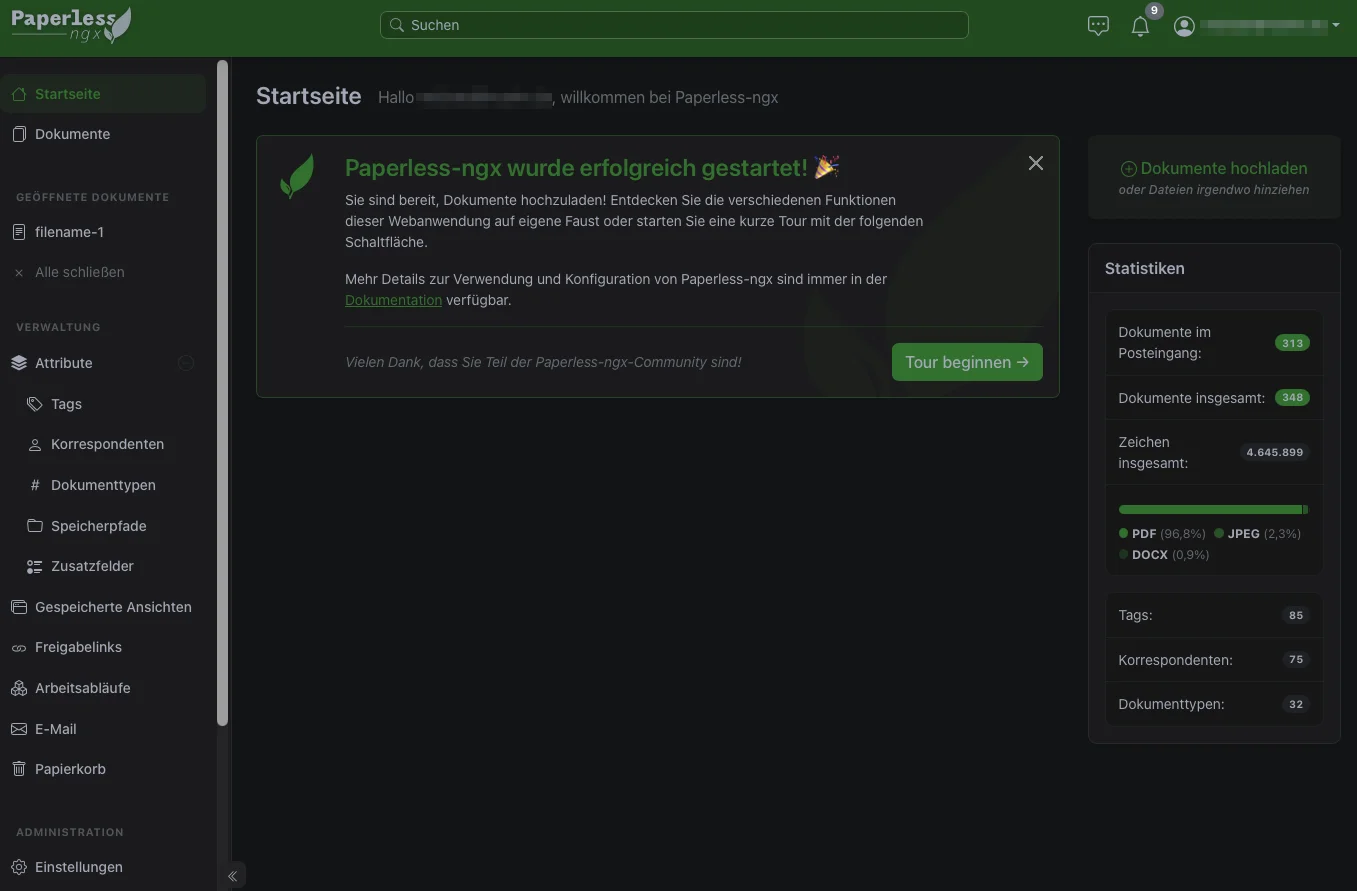
Die Startseite erzählt die Geschichte in Zahlen:
- 348 Dokumente, fast alles PDFs (96,8 %), dazu ein paar Handyfotos (JPEG) und Word-Dateien.
- 4,6 Millionen Zeichen erkannter Text – alles jetzt durchsuchbar.
- 85 Tags, 75 Korrespondenten, 32 Dokumenttypen. Diese Struktur habe ich nicht vorab geplant; sie ist aus den Vorschlägen der KI und meinen Korrekturen gewachsen.
- 313 noch im Posteingang. Das ist Absicht: Die KI schlägt vor, ich bestätige. Ein Dokument verlässt den Posteingang erst, wenn ich es mir angesehen habe.
Warum es hier auf „lokal“ ankommt
Die Dokumentation von Paperless sagt es deutlich: Mit eingeschalteten KI-Funktionen schickt Paperless den Inhalt der Dokumente an den jeweils eingestellten KI-Anbieter. Mit einer Cloud-API hieße das: Kontoauszüge, Arztbriefe, Steuerbescheide und Verträge gingen alle an einen Dritten.
Mit Ollama verlässt der Text meinen Mac nie. Kein API-Schlüssel, keine Kosten pro Dokument, keine Nutzungsbedingungen zum Durchlesen. Für diese Art von Daten ist das der einzige Aufbau, mit dem ich mich wohlfühle.
Wie es weitergeht
- Die restlichen 313 Dokumente im Posteingang nach und nach durchgehen.
- Den Dokumenten-Chat ausprobieren – Fragen wie „Wann verlängert sich meine Kfz-Versicherung?“ über alle Dokumente hinweg. Am besten funktioniert er mit dem optionalen RAG-Index, der zusätzlich ein Embedding-Modell braucht (bei Ollama standardmäßig
embeddinggemma) – und bei 16 GB noch ein Stück mehr vom freien Stuhl. - Vielleicht ein größeres Modell testen und sehen, ob die Vorschläge spürbar besser werden – oder ob der Arbeitsspeicher einfach Nein sagt.
Die Schublade gibt es noch. Sie ist nur sehr viel leerer geworden.
Every household has the drawer: letters from the tax office, insurance policies, the warranty for a washing machine that died years ago. Mine had been growing for a long time. This week I finally did something about it — with an AI doing the sorting. Not one in a data centre somewhere, but one running on the Mac on my desk.
What Paperless-ngx is
Paperless-ngx is an open-source document management system (GPL-3.0) that you host yourself. You hand it a PDF, a scan or a phone photo of a letter; it runs OCR, stores the file and makes every word searchable. Then it files each document by correspondent (who sent it), document type (invoice, contract, notice …) and tags. It is the community-maintained successor of the original Paperless and of paperless-ng, and with more than 46,000 stars on GitHub one of the most popular self-hosted projects around.
On my Mac, Paperless runs in Docker. The web interface opens in the browser like any other app — no cloud account, no subscription.
Where the AI comes in
Paperless has always been able to learn from you: its built-in classifier watches how you file documents and suggests the same for new ones. But it needs examples first, and on day one, with an empty system and a pile of 348 documents, there aren't any.
Since version 3.0 (July 2026), Paperless-ngx can also ask a language model. When you open a document, the model reads its text and suggests a title, a date, tags, a correspondent and a document type. The feature is opt-in and replaces nothing — the classic classifier keeps working next to it.
The interesting part is the backend. Paperless can talk to an OpenAI-compatible API, or to Ollama, which runs open models on your own hardware. I chose the second.
The setup: gemma3:4b on a 16 GB Mac
The model is Gemma 3 with 4 billion parameters (gemma3:4b), Google's small open model, pulled through Ollama. Ollama runs directly on the Mac, so it can use the Apple chip's GPU; Paperless reaches it from inside its container. On the Paperless side it comes down to a handful of settings:
PAPERLESS_AI_ENABLED=truePAPERLESS_AI_LLM_BACKEND=ollamaPAPERLESS_AI_LLM_MODEL=gemma3:4b- the address of the local Ollama server
The real limit isn't the model, it's the memory. A Mac with 16 GB shares that memory between everything: Docker with Paperless, Ollama with the model, the browser, the system. While I was importing, Cursor alone was sitting on about 2.5 GB — so I closed it for the duration. With that headroom back, everything ran smoothly. Lesson learned: on 16 GB, a local AI is a guest that needs a free chair.
How fast, how good?
A three-page PDF with normal-size text takes about 20 seconds until the suggestions appear. That's not instant, but it's a fraction of the time it would take me to read the letter, decide on a correspondent and type, and pick the tags by hand.
And the suggestions are very good. A 4B model isn't a genius, but for German paperwork it doesn't need to be: it has to recognise that the Finanzamt is the correspondent, that a "Bescheid" is a notice, and which tags fit — and that it does reliably.
348 documents later
The dashboard tells the story in numbers:
- 348 documents, almost all PDFs (96.8 %), plus a few phone photos (JPEG) and Word files.
- 4.6 million characters of recognised text — all of it searchable now.
- 85 tags, 75 correspondents, 32 document types. I didn't plan this structure up front; it grew out of the AI's suggestions and my corrections.
- 313 still in the inbox. That's deliberate: the AI suggests, I confirm. A document only leaves the inbox once I've looked at it.
Why local matters here
The Paperless documentation says it plainly: with the AI features switched on, Paperless sends document content to whichever AI provider you configure. With a cloud API, that would mean bank statements, medical letters, tax notices and contracts all going to a third party.
With Ollama, the text never leaves my Mac. No API key, no cost per document, no terms of service to read. For this kind of data, it's the only setup I'd be comfortable with.
What's next
- Work through the remaining 313 inbox documents, a few at a time.
- Try the document chat — questions like "When does my car insurance renew?" across all documents. It works best with the optional RAG index, which needs an embedding model as well (Ollama's default is
embeddinggemma) — and on 16 GB, a bit more of that free chair. - Maybe try a bigger model and see whether the suggestions get noticeably better — or whether the memory simply says no.
The drawer is still there. It's just a lot emptier now.
Hat Ihnen dieser Beitrag gefallen?
Ich freue mich über Ihr Feedback oder ein Gespräch über Ihr eigenes Projekt.
Kontakt aufnehmen